
After years of manually exporting and renaming Data Merge-generated market sheets in InDesign, I decided to automate this process. The result? A free, open-source script that handles batch exports with intelligent file naming.
The Problem
Data Merge in InDesign is powerful for generating multiple pages from data, but it lacks flexible export options. I detest repeated tasks that are needlessly tedious – there is almost always a better, more efficient way to get the job done. When you need files named based on their content (like “2025-UCLA-Market-Sheet.pdf” instead of “Page1.pdf”), you’re stuck with manual work.
The Solution
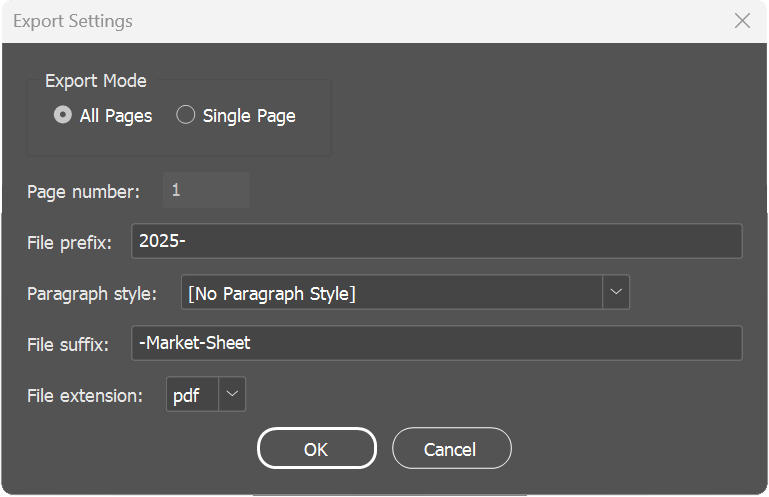
Working with Claude AI, I developed a script that:
- Exports all pages or a single page
- Names files based on page content, pulling from a selected Paragraph Style
- Supports PDF, JPG, and PNG formats
- Handles special characters intelligently
- Works with cloud storage
Development Process
The script went through 12 revisions over approximately 2 hours, utilizing Anthropic Claude AI. Each iteration improved functionality:
- Initial file export capability
- Enhanced UI design
- Improved file dialog integration
- Robust error handling
- Special character management
Using LLM for Development
Pros:
- Rapid prototyping and iteration
- Boosts my otherwise novice JavaScripting skills
- Comprehensive error handling
- Best practices implementation
- Detailed documentation generation
- Suggestions for improvement
Cons:
- Need for careful testing of each version
- Some trial-and-error with InDesign-specific features
- Required understanding of desired functionality to guide development
Try It Yourself
Find the script on GitHub. Feedback and contributions welcome!